Find the weak link in your USB-C setup.
See what the Mac port, cable, dock, adapter and device each support, the speed and power they agreed to use, and where the connection is being limited.
Free: understand the current connection.Pro: inspect the evidence, watch measurements and investigate changes over time.Compare Free and Pro
One-time purchase, yours permanently. Two Macs. 14-day refund, no questions asked. macOS 14+ on Apple Silicon.
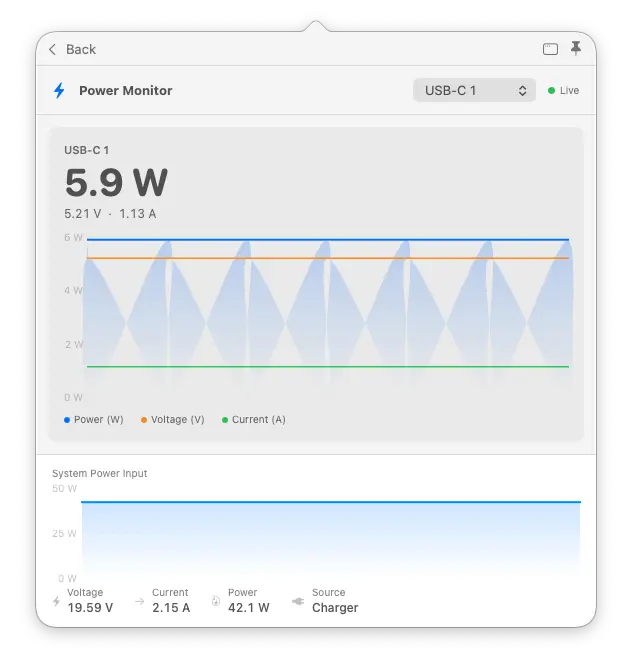
Is the power steady, or does it keep dropping?
Watch the available power readings over time, rather than relying on a single number. Power Monitor shows watts, voltage and current for the selected port, alongside your Mac’s overall power input, so changes are easier to spot.
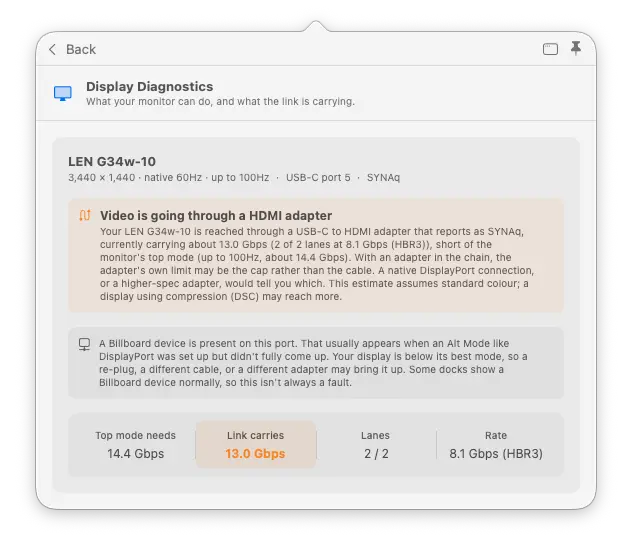
Your monitor supports more. Is the adapter holding it back?
Compare what your monitor supports with what the display connection can carry. This example identifies an HDMI adapter and shows that the available connection bandwidth falls short of the monitor’s top mode—giving you a useful place to investigate.
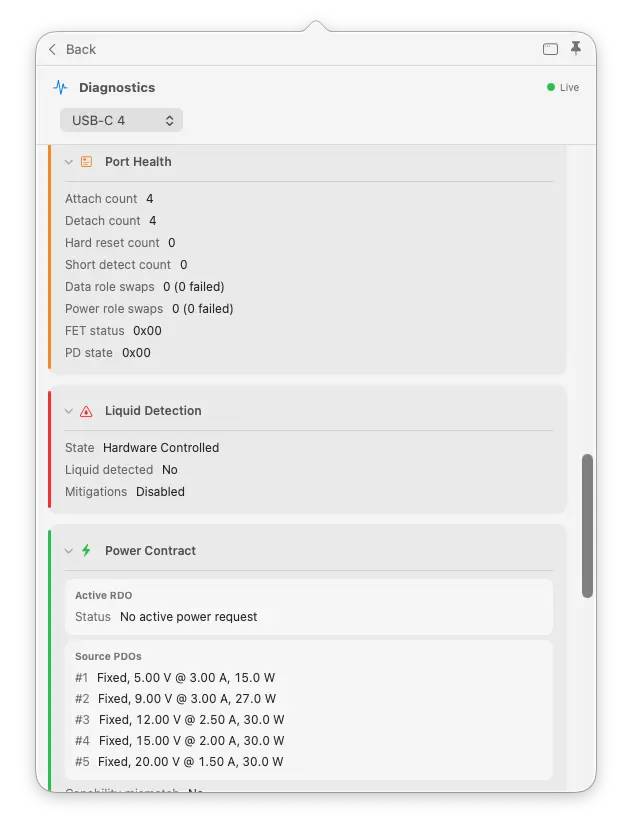
The drive keeps dropping out, but never while you are watching.
See the connection events and errors reported by each port. Open the technical details to inspect charging agreements, event messages, individual signal paths and liquid-detection information.
Prefer the Terminal?
Run a quick check, feed readings into a script, or keep a live dashboard open. Your Pro licence works in the app and Terminal on the same Mac.
CLI: run a check when you need it
The command-line interface gives you connection details with a typed command. Free includes basic scans, JSON output for scripts, and watch mode for connection changes.
whatcable
whatcable --json
whatcable --watch
Pro adds live power monitoring. Watch the available readings in Terminal, or stream them as JSON to record and analyse changes in your own tools.
whatcable --monitor
whatcable --monitor-json
TUI: watch your connections live
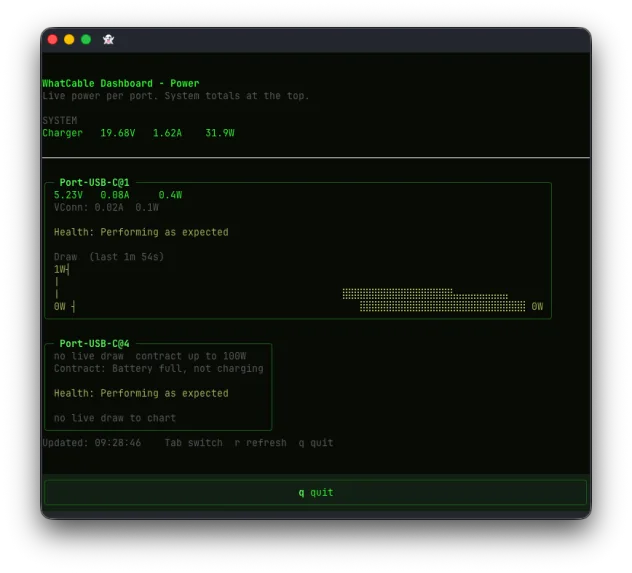
Included with Pro. The text-based user interface is an interactive dashboard inside Terminal. Switch between Overview, Negotiation and Power screens with Tab, and select ports with the arrow keys.
Start it with whatcable --dashboard. Press q to quit.
Simple, one-time pricing
Unlock every Pro feature on two Macs. No subscription and no recurring charge.
- Every Pro feature unlocked immediately
- Yours permanently. No subscription, no renewal.
- Works on up to 2 Macs with one key
- Your key appears on screen the moment you pay, and by email
- 14-day refund, no reason needed
- Keeps working even if we ever retire the licence server
- 30-day offline grace period, no internet needed day to day
Requires macOS 14 Sonoma or later on Apple Silicon. Download WhatCable Free first if you want to check compatibility.
Buying a licence means you accept the terms and conditions. Need more Macs? Buy additional licences, or ask about volume licensing for 10+ Macs.
Student or educator? Email [email protected] from your academic address for 50% off.
What's in each tier
The free app covers everything most people need. Pro is for engineers, power users, and anyone who wants the full picture.
| Feature | Free | Pro |
|---|---|---|
| Cable identity | ||
| Cable type (active / passive / optical) | Included | Included |
| E-marker identity (VID/PID, vendor name) | Included | Included |
| Speed and power ratings from e-marker | Included | Included |
| Detailed device and cable identity (VDOs) | Not included | Included |
| Mid-session fault warnings (overcurrent, connection drops) | Included | Included |
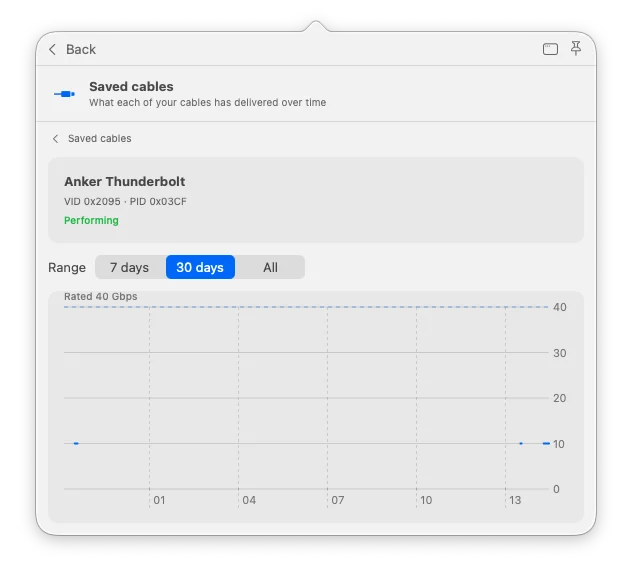
| Cable history (named cables, per-cable timeline and verdict) | Not included | Included |
| Power | ||
| Basic charger info (voltage, wattage) | Included | Included |
| Live power metering (watts, amps, volts) | Not included | Included |
| Charging agreement (PD profiles and selected request) | Not included | Included |
| Cable resistance estimation | Not included | Included |
| CC advertisement level | Not included | Included |
| Port diagnostics | ||
| Negotiation Diagnostics (Mac port / cable / device breakdown) | Not included | Included |
| Display Diagnostics (monitor top mode vs link) | Not included | Included |
| Connection state and orientation | Included | Included |
| Thunderbolt link info (gen, lanes, bandwidth) | Included | Included |
| Port health counters (resets, errors, FET failures) | Not included | Included |
| PD event trace | Not included | Included |
| DP Alt Mode details and EDID | Not included | Included |
| Liquid detection sensor status | Not included | Included |
| App and CLI | ||
| Menu bar app with popover | Included | Included |
| Desktop widgets (small / medium / large) | Included | Included |
JSON output (whatcable --json) | Included | Included |
| Power monitor window (live charts) | Not included | Included |
CLI monitor mode (whatcable --monitor) | Not included | Included |
TUI dashboard (whatcable --dashboard) | Not included | Included |
| Widget power sparkline | Not included | Included |
Explore the detailed Pro tools
More of what Pro can see
New to the terms? Explore our interactive cable diagram to see how charging, data and video use the parts inside a USB-C cable.
Every one of these inspects a connection in more detail than the free app can. The full Free and Pro comparison follows below.
Cable history
Name a cable, recognise it on later connections, and keep a timeline of how it performs.
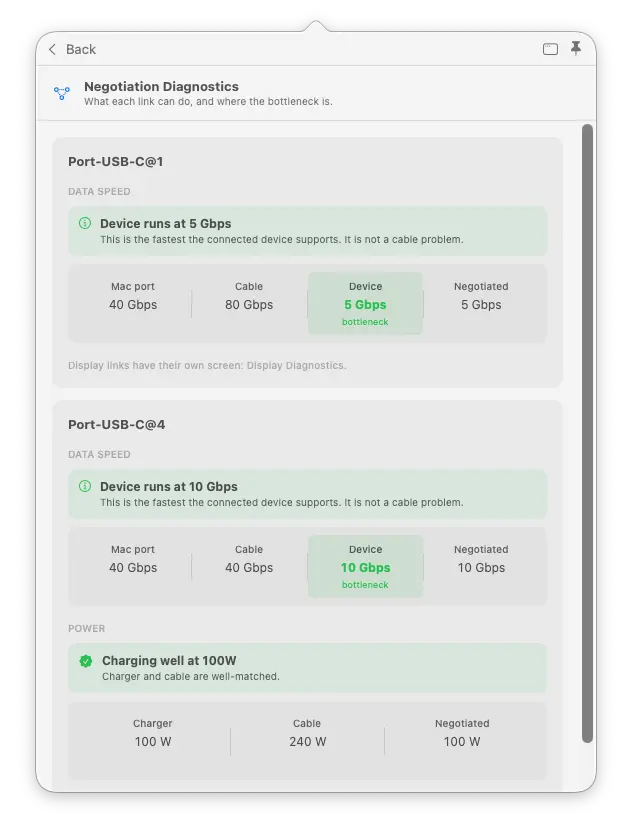
Negotiation Diagnostics
Find out which part of the connection is holding it back: your Mac’s port, the cable or the connected device.
Technical detail
“Negotiated” means the speed or power the connected devices have agreed to use. WhatCable compares this with the reported capabilities of each part, and identifies a limit when the available evidence supports it.
Display Diagnostics
Find out why your screen is not as sharp or smooth as expected. Compare its picture settings with what the screen and its connection can support.
Technical detail
Resolution describes picture detail; refresh rate is how often the picture updates. Display Diagnostics compares these with the monitor’s reported modes and the DisplayPort connection’s lanes and rate. It accounts for Display Stream Compression (DSC), which fits the picture into less bandwidth, and adapter information when available. A lower link rate can be appropriate for the selected picture setting.
Live power metering
See how much power your Mac reports through each port, with readings updated every two seconds.
Technical detail
Watts (W) measure power, amps (A) measure current and volts (V) measure voltage. Where live per-port readings are unavailable, WhatCable shows the agreed maximum instead. That limit is not the same as the power being used at that moment.
PD contract inspector
See which charging options your charger offers and which one your Mac is using. This helps explain why a powerful charger may be charging at a lower rate.
Technical detail
USB Power Delivery (PD) is how compatible devices agree charging power. The agreement is called a power contract. Power Data Objects (PDOs) describe the available charging profiles. The inspector shows voltage, current and available profiles, and flags capability mismatches.
Cable resistance estimation
Estimate how much the cable resists the flow of electricity. This can help you investigate power loss while testing a cable.
Technical detail
The estimate uses multiple power samples and is shown in milliohms (mΩ), a unit of electrical resistance. It is an estimate, not a direct measurement or proof that a cable is worn.
Port health counters
Look for repeated disconnects, restarts and electrical errors reported by a port. Changes over time can help you investigate an unreliable connection.
Technical detail
Counters can include attach/detach events, hard resets, power-role swaps and internal communication or switching errors. A power-role swap changes which device supplies power. These are reported events, not a complete lifetime wear record or proof that the cable caused a fault.
PD event trace
Follow what happened when you connected a cable: the charging setup, any interruptions and the final agreement.
Technical detail
The USB Power Delivery event trace shows the protocol messages and events reported for a port, including attachment, contract negotiation and hard resets that restart power negotiation.
DP Alt Mode details
See how the picture travels from your Mac to the screen, along with the display information your Mac can read.
Technical detail
DisplayPort Alt Mode carries DisplayPort video through USB-C. The details include lane count (the signal paths in use), link rate (their speed), and whether video travels directly or through a Thunderbolt tunnel. EDID is the monitor’s identity and capabilities data, which can include its model, manufacturer and year.
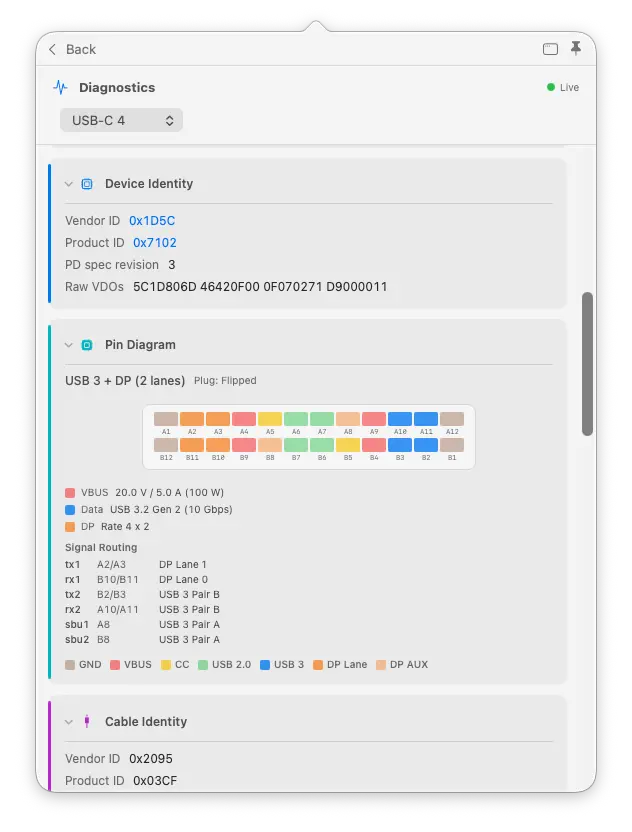
Raw VDO identity
Inspect the exact identity data reported by the cable and connected device, beyond the usual summary.
Technical detail
Vendor Defined Objects (VDOs) are structured blocks of identity and capability information. SOP addresses the connected device; SOP′ addresses cable electronics. Keeping them separate helps distinguish the device’s claims from the cable’s.
Liquid detection
Check the liquid-detection state reported for a USB-C port when investigating an intermittent connection.
Technical detail
WhatCable displays the available liquid-detection controller state, also called LDCM. This is a report from the Mac’s hardware, not a physical inspection of the port.
Power monitor window
Watch a chart of power and voltage over time while you try a charger or cable. Keep the window open beside your work.
Technical detail
The chart shows the available per-port readings. Where the Mac does not provide live power draw, the displayed negotiated maximum is the agreed limit, not measured consumption.
CLI monitor mode
whatcable --monitor streams live power and cable state to your terminal. Pipe it, script it, log it.
TUI dashboard
A live full-screen terminal view of ports, power, and Thunderbolt. Three screens, updates every 2 seconds. For the SSH and tmux crowd: whatcable --dashboard.
Widget power sparkline
Desktop widget shows a power chart alongside cable status, updated periodically by macOS on its own schedule. Glance at your desktop and see charging trends without opening anything.
CC advertisement level
Rp current advertisement level with inferred CC line voltage. See what current level your port's pull-up resistor is advertising to attached devices.
What reviewers said.
A tiny app that does one thing, does it well.
WhatCable does a fine job of analyzing the cables attached to your Mac.David Nield, Lifehacker
Finally tells you what your USB-C cables can actually do.Brady Snyder, MakeUseOf
From Pro users
Clear explanation, no corporate nonsense, and then a new version shipped almost immediately. That is honestly impressive.
The app is so good, love it.
Great software. Great support.
Common questions
Does this work on Intel Macs?
What macOS version do I need?
How does activation work?
Can I use one key on multiple Macs?
Is the free version still available?
What if I need a refund?
Find the limit, then fix it.
One-time purchase, yours permanently. Two Macs, every Pro diagnostic unlocked immediately, and a 14-day refund if it isn't for you.