macOS menu bar diagnostics for USB-C

Know what your USB-C cable can really do.

WhatCable explains cable speed, charging limits, e-marker data, and connected devices in plain English. No more guessing why a cable charges slow or refuses to drive your display.

Or unlock advanced diagnostics with WhatCable Pro

Open source, Pro optional Apple Silicon, macOS 14+ Signed and notarised
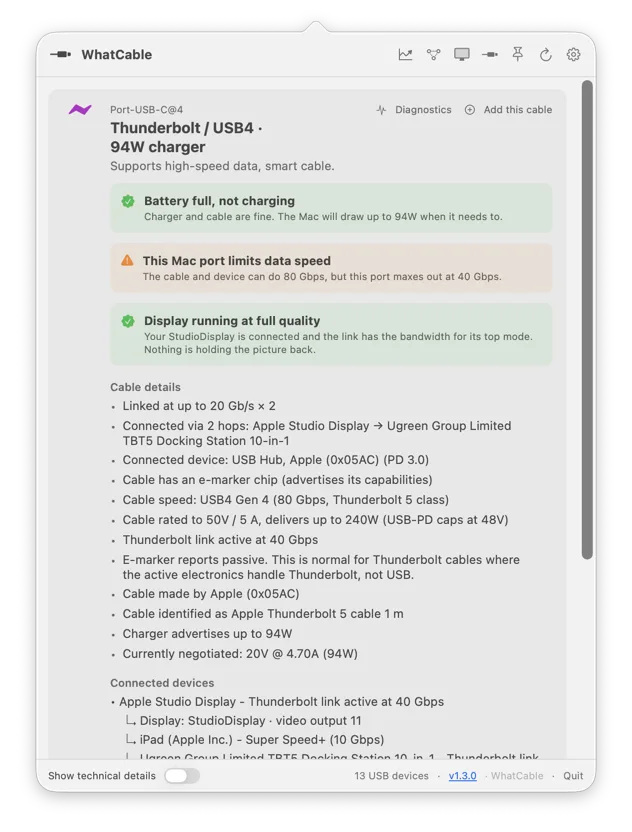
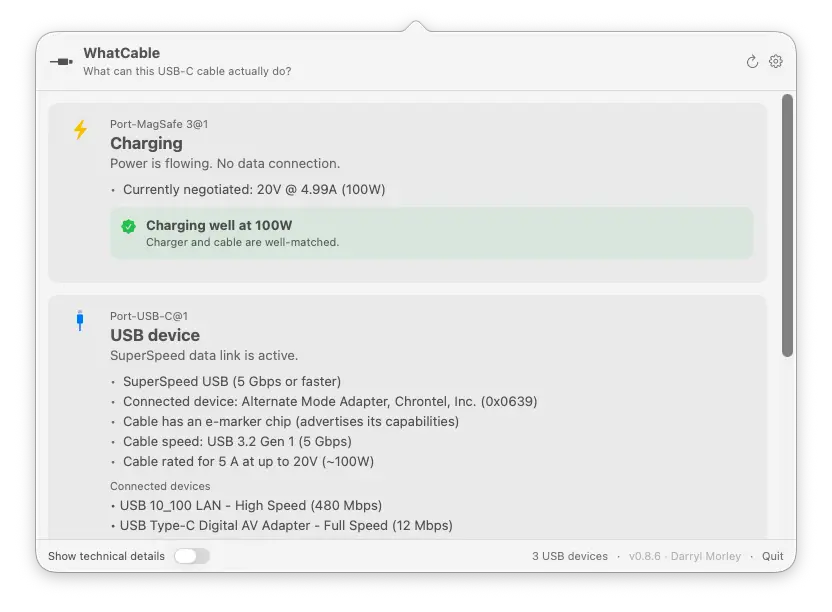
WhatCable menu bar popover showing USB-C port diagnostics: a monitor connected through a USB-C to HDMI adapter, with WhatCable explaining the adapter is holding it below the display's top mode, and a 100W charger with the battery full

As featured in

Lifehacker MakeUseOf Adafruit Boing Boing

Every USB-C cable looks the same. They are not.

Your drawer is full of identical-looking cables. Some charge at full speed, some crawl. Some carry video, some can barely handle a mouse. The connector tells you nothing.

USB 2.0
480 Mbps, 60W

Charges slowly, no video output. Fine for a keyboard, terrible for an external display or fast storage.

USB4
40 Gbps, 100W

Fast data, good charging. Handles most displays and external SSDs without issues.

Thunderbolt 4
40 Gbps, 240W

Full speed data, maximum charging, dual 4K displays. The cable your dock needs but you cannot tell by looking.

Plain answers for cables that all look the same.

WhatCable reads the USB-C and USB Power Delivery details macOS already exposes, then turns them into useful labels, charging diagnostics, and port-by-port device context.

Charging bottlenecks

See whether the cable, charger, or Mac is limiting the current charge rate, with the negotiated power profile highlighted.

Data-speed bottlenecks

A plain-English verdict on what is limiting the link: the Mac port, the cable, or the device, so you know whether a faster cable would actually help.

Display bottlenecks

When a monitor is connected, see whether the link is carrying its full resolution and refresh, or falling short, and whether an adapter, the cable, or the selected mode is the limit.

Cable e-marker data

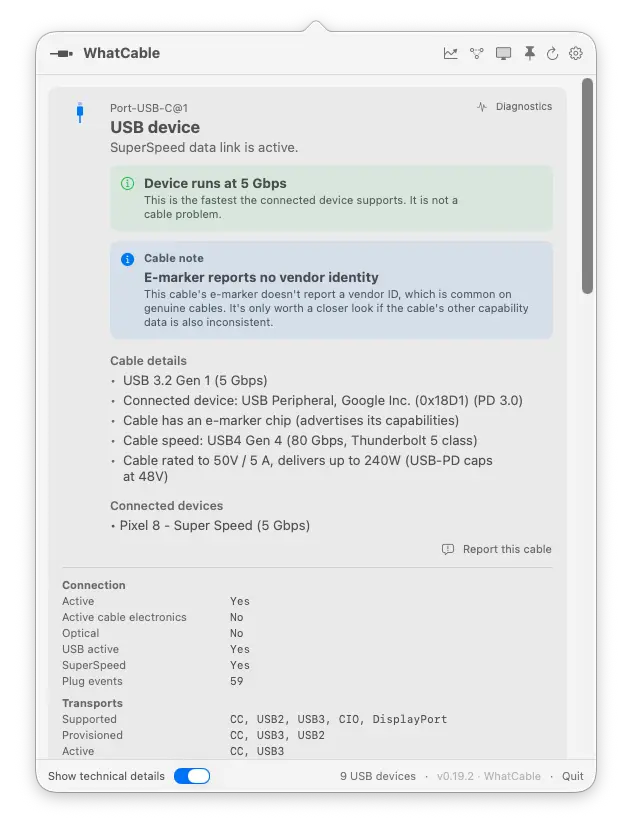
Decode cable speed, current rating, vendor identity, and USB PD capability flags from marked USB-C cables.

Active transports

Identify USB 2, USB 3, USB4, Thunderbolt, and DisplayPort paths under the physical port where they are connected.

Engineer mode

Option-click or enable raw details to reveal the underlying IOKit properties when you need the registry-level facts.

Device identity

Match storage, hubs, docks, and peripherals back to the port they are using, including the negotiated USB speed.

Built for macOS

A focused menu bar app on Apple Silicon Macs. No helper daemon, no private API, no background uploads.

See what your cables are doing right now.

The free app tells you what your cable can do and, in plain English, where the bottleneck is. Pro shows you the full picture: live power flowing through each port, real-time PD contracts, the full negotiation breakdown of every connection, port health over time, and the raw VDO fingerprints behind every cable.

12 advanced features, £9.99 one-time, works on up to 2 Macs.

Unlock Pro

The same diagnostic engine in your terminal.

The bundled CLI gives you quick snapshots, structured JSON for scripts, and watch mode when you are swapping cables during testing.

  • Readable summaries for quick cable checks.
  • Pipe JSON into jq for repeatable diagnostics.
  • Live updates as ports connect and disconnect with --watch.
$ whatcable

USB-C Port 1
  ✓ Charging well at 96W
  Cable: 5A, 100W, USB4 40 Gbps
  Charger: 5V / 9V / 15V / 20V PDOs

USB-C Port 2
  ! Cable is limiting charging speed
  Cable: 3A, 60W, USB 2.0
  Device: External SSD, USB 10 Gbps

Spot cables that don't add up.

WhatCable checks the e-marker data against the USB Power Delivery spec. When something looks unusual, an orange card appears with the details. It is not a guarantee the cable is fake, but it tells you where to look.

  • Vendor ID checked against the USB-IF published list.
  • Speed and current fields validated against PD spec ranges.
  • Reserved bit patterns and zero-value metadata flagged.
Cable trust flags
  • Vendor ID is 0x0000 (not registered with USB-IF)
  • Cable latency field uses a reserved value
  • Claims 5A current but reports USB 2.0 speed

Cables seen by WhatCable users.

Every cable reported through the app gets added to a public, searchable database. Check if your cable has been seen before, or browse what others are using.

USB4 80 GbpsCalDigit TB5 cable240W, passive
USB4 40 GbpsUGREEN Revodok Max 213100W, passive
USB 2.0Anker 333 nylon100W, passive
USB 3.2 Gen 2Monoprice Essentials100W, passive
USB4 40 GbpsCalDigit TS4 bundled100W, passive
Browse all cables

Make it yours.

WhatCable stays out of the way until you need it. A few settings let you control how it runs and what it shows.

Notifications

Get alerts when cables connect or disconnect.

Dock mode

Run as a regular window instead of a menu bar icon.

Launch at login

Start automatically so it is ready when you plug in.

Hide empty ports

Only show ports with something plugged in.

Need more? Pro goes deeper.

The free app covers cable identity, charging info, device detection, and a plain-English verdict on what is limiting each link. Pro shows the full breakdown: Negotiation Diagnostics with Mac port, cable, and device side by side and the weak link called out, Display Diagnostics showing whether the link is carrying your monitor's full resolution and refresh, plus live power metering, PD contract inspection, port health counters, and more. All from IOKit, no extra software needed.

£9.99 one-time. Works on up to 2 Macs.

Negotiation DiagnosticsMac port, cable, and device support side by side, with the weak link highlighted.
Display DiagnosticsWhether the link is carrying your monitor's full resolution and refresh, or falling short.
Live power meteringWatts, amps, and voltage per port, updating every 2 seconds.
Port health countersLifetime resets, shorts, errors, and FET failures per port.
DP Alt Mode and EDIDLane count, link rate, and full monitor identity over USB-C.
PD contract inspectorFull PDO list, active voltage/current, and mismatch flags.

Common questions.

Does it work on Intel Macs?

No. Intel Macs use Titan Ridge Thunderbolt controllers that don't expose USB-PD state or cable e-marker data through any public macOS API. WhatCable needs Apple Silicon (M1 or later) to read this information.

Is it really free?

Yes. The WhatCable app is free and open source under the MIT licence. No ads, no tracking. WhatCable Pro (£9.99, optional) adds advanced diagnostics for power users. See what's included.

What does WhatCable Pro add?

Pro unlocks 12 advanced features including live power metering, port health counters, PD contract inspection, and raw VDO identity. One-time £9.99, no subscription, works on up to 2 Macs. See full features and comparison.

Does it phone home or collect data?

No. There are no analytics, no telemetry, and no network requests. The app reads local IOKit data and nothing else. Check the source on GitHub if you want to verify.

Why does my cable show no e-marker data?

Cheap USB 2.0 cables and most cables rated under 3A don't have an e-marker chip. WhatCable can only show what the cable reports. If there is no chip, there is no data to decode.

Can it tell me if a cable is fake?

Not definitively. The trust signals feature flags values that look unusual against the USB-PD spec, like a zero vendor ID or reserved bit patterns. A flag means "worth checking," not "definitely counterfeit."

Pick the install that fits how you work.

Menu bar app, command-line tool, or both. Signed, notarised, and universal. Requires macOS 14 or later on Apple Silicon.

Recommended: Homebrew

Menu bar app plus the whatcable CLI on your PATH.

brew tap darrylmorley/whatcable
brew install --cask whatcable
CLI only

Just the whatcable command, no menu bar app. Same signed binary, useful for terminal-only setups and scripts.

brew tap darrylmorley/whatcable
brew install whatcable-cli
Direct download

Grab the latest .zip from GitHub Releases. The release page also has a CLI-only zip. Drag WhatCable.app into Applications.

Get the latest release